
Showing posts with label office. Show all posts
Showing posts with label office. Show all posts
Wednesday, January 27, 2010
Rendering: Li & Fung,
New York, NY
This is a visualization which I did for an office furniture client in New York. It was a space planning and color scheme exercise, that is why you see 2 countertops with different colors.


Wednesday, January 13, 2010
MS Office Advanced: Issue Converting docs to PDF's
Hi there.
Have you ever had that frustrating occurrence when you try to make a PDF from a Microsoft Word doc, and the computer tells you it can't find PDFMaker and asks if you want to reinstall in ...yada, yada... 'What does this error message mean'-land? Note that MS Word and Acrobat Professional are installed in this instance...
Here's a fix:
1. Close all MS Office Apps.
2. In Explorer, go to 'C:\Documents and Settings\Application Data\Microsoft\Templates' (note: this was done in XP).
a. If you see a file named '~$Normal', you have not clo sed all of the MS Office programs. go back to Step 1.
b. Rename Normal.dot to anything else (You can delete this file after this is fixed).
3. Open MS Word
a. In the drop-down menu, click on Help > About. 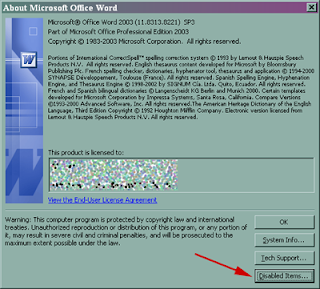
b. This brings up a dialog box, at the bottom, click on 'Disabled Items...'(Button)
c. If 'PDFMaker' is showing up in the dialog box , Re-enable PDFMaker by clicking on the name in the box.
d. Click on the 'Enable' button. 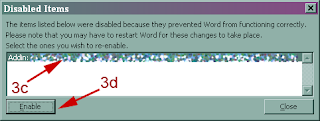
4. Close and open MS Word.
5. Try Word to PDF conversion and see if it works.
This worked on my issue. If this didn't work, I'm sorry - you'll have to keep on searching for the solution...
...thanks for listening...
Have you ever had that frustrating occurrence when you try to make a PDF from a Microsoft Word doc, and the computer tells you it can't find PDFMaker and asks if you want to reinstall in ...yada, yada... 'What does this error message mean'-land? Note that MS Word and Acrobat Professional are installed in this instance...
Here's a fix:
1. Close all MS Office Apps.
2. In Explorer, go to 'C:\Documents and Settings
a. If you see a file named '~$Normal', you have not clo
b. Rename Normal.dot to anything else (You can delete this file after this is fixed).

c. If 'PDFMaker' is showing up in the dialog box
d. Click on the 'Enable' button.

5. Try Word to PDF conversion and see if it works.
This
...thanks for listening...
Subscribe to:
Posts (Atom)
